
Notice
Recent Posts
Recent Comments
Link
| 일 | 월 | 화 | 수 | 목 | 금 | 토 |
|---|---|---|---|---|---|---|
| 1 | 2 | 3 | 4 | 5 | ||
| 6 | 7 | 8 | 9 | 10 | 11 | 12 |
| 13 | 14 | 15 | 16 | 17 | 18 | 19 |
| 20 | 21 | 22 | 23 | 24 | 25 | 26 |
| 27 | 28 | 29 | 30 |
Tags
- tensorflow
- mssql
- Excel
- 리눅스
- MS-SQL
- javascript
- PyQt
- 맛집
- 유니티
- GIT
- 라즈베리파이
- swift
- 다이어트
- node.js
- MySQL
- 날짜
- port
- Linux
- IOS
- Unity
- 함수
- flutter
- PER
- ubuntu
- pandas
- ASP
- python
- PyQt5
- urllib
- sqlite
Archives
아미(아름다운미소)
라즈베리파이 파이썬 경로 재 지정 본문
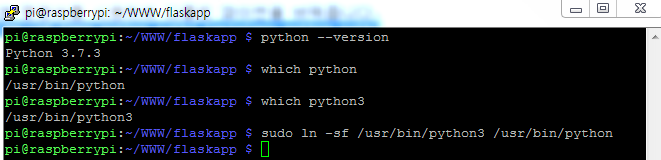
1. 기본 python 버전을 확인합니다.
$python --version
2. 기본 Python의 위치(PATH)를 확인합니다.
$which python
3. 변경할 새로운 Python 3.X 의 위치(PATH)를 확인합니다.
$which python3
4. 아래 명령어를 사용하여 디폴트 파이썬을 바꿔줍니다.
$sudo ln -sf [new_python_path] [privious_python_path]
'랭귀지 > python' 카테고리의 다른 글
| python3 beautifulsoup 한글 깨짐 (0) | 2020.04.13 |
|---|---|
| python3.7 pip install beautifulsoup Error (0) | 2020.04.11 |
| pyqt5 label backgroundcolor (0) | 2020.02.19 |
| Pyinstaller “Failed to execute script pyi_rth_pkgres” and missing packages (0) | 2020.02.06 |
| python pip 특정 버전설치 및 설치 (0) | 2020.02.03 |
'랭귀지/python' Related Articles
more


Comments